version
Get the version of the installed Commitizen or the current project (default: installed commitizen).
Usage
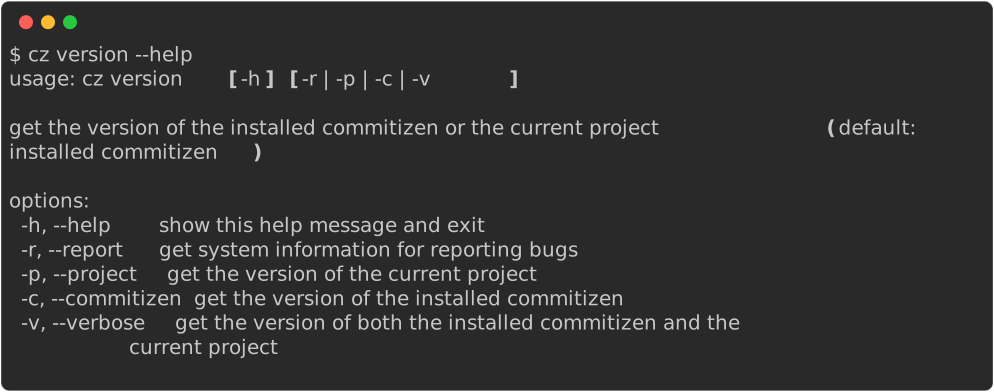
Project version and scheme
cz version --projectprints the version from your configured version provider.cz version MANUAL_VERSION(optional positional) uses that string instead of the provider, so you can try how your configured scheme parses and formats it.
Components and next version
--major,--minor,--patch: print only that component of the (possibly manual) project version. Requires--project,--verbose, or a manual version.--next[MAJOR|MINOR|PATCH|NONE]: print the version after applying that bump to the current project or manual version.NONEleaves the version unchanged.--next USE_GIT_COMMITS: derive the bump automatically from the commits since the tag matching the current version, using your commit rules' bump map (the same logic ascz bump). Passing--nextwith no value defaults toUSE_GIT_COMMITS. If no tag matches the current version, all commits are considered. When there are no new commits (and the current version is not a pre-release), the command errors out. The functionality does not yet include advanced versioning like prereleases or exact_increment.--tag: print the version formatted with yourtag_format(requires--projector--verbose).
Examples
cz version --project
cz version 2.0.0 --next MAJOR
cz version --project --major
cz version --verbose

# Derive the next version from the commits since the current version's tag
cz version --project --next USE_GIT_COMMITS
# Equivalent shorthand (--next defaults to USE_GIT_COMMITS)
cz version --project --next
# Retrieve just the next major part of the version
cz version --project --next --major
# Works with a manual version too
cz version 1.4.0 --next
# Combine with --tag to format the derived version using your tag_format
cz version --project --next --tag